
Makers API
The Makers API lets your own tooling drive ShortPlay Studio over HTTP — the same upload, publish, and edit actions the Studio UI performs, called with a Personal Access Token (PAT) instead of a browser session. This page covers minting a token, what a PAT can (and can't) do, the generated route reference, and a copy-pasteable walkthrough for publishing a game end to end.
Personal access tokens
Mint tokens from Studio → Settings → API tokens:
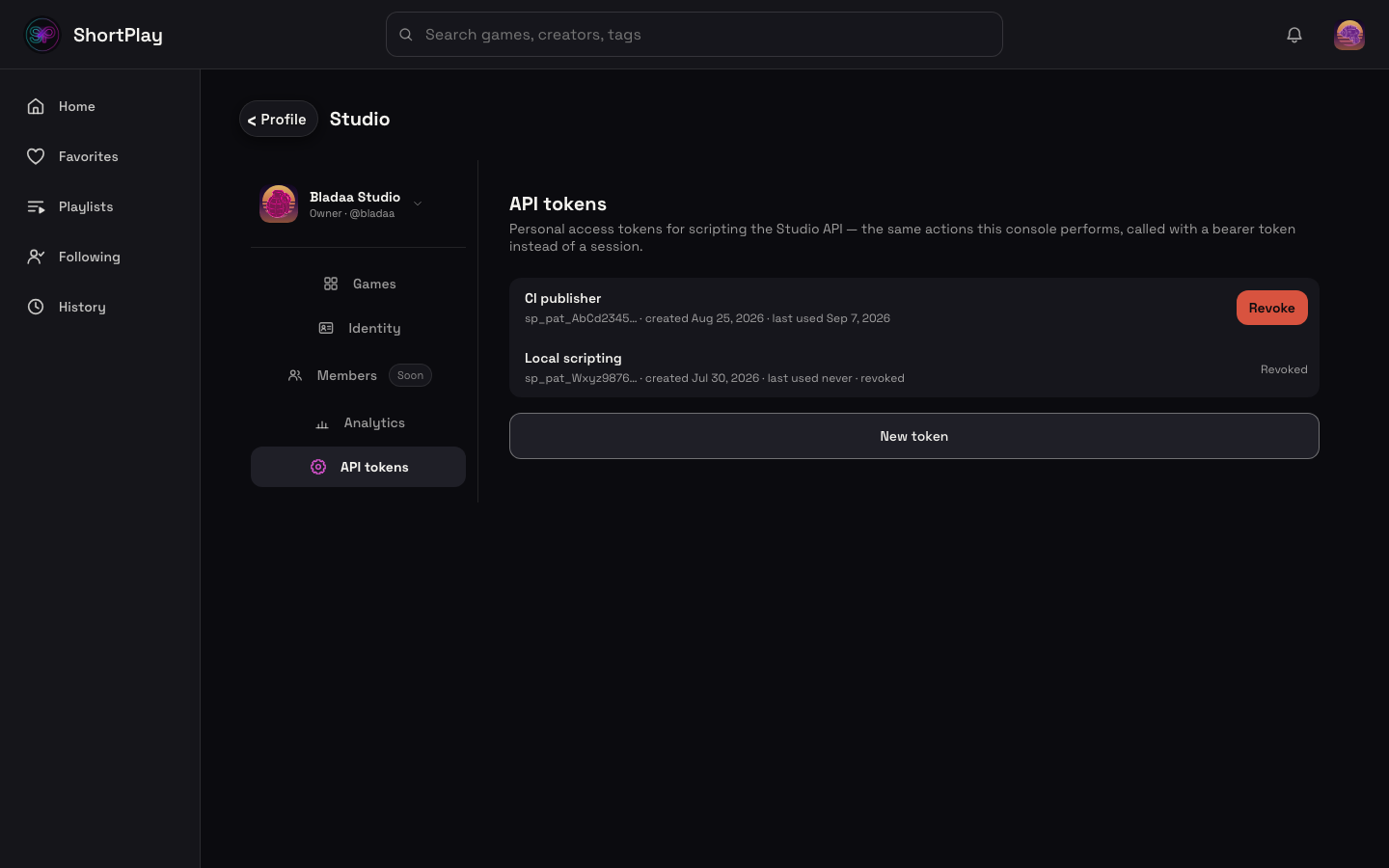
- Click New token, give it a name (e.g.
"CI publisher"— anything that helps you tell your tokens apart later; a token isn't scoped by name, it's a full credential for your account). - Click Create. The raw token is shown once, in a
sp_pat_…-prefixed value — copy it immediately. ShortPlay never stores the raw value, only its hash; if you close the dialog without copying it, the token still works, you just can't see it again (revoke it and mint a new one instead of trying to recover it). - Use it as a bearer credential:
Authorization: Bearer sp_pat_AbCd1234…on every request. - The tokens list shows each token's name, its prefix (enough to recognize it — never the full value again), when it was created, and when it was last used — so you can spot a token that's gone stale or one that's being called from somewhere you didn't expect.
- Revoke is immediate and irreversible: the very next call with that token gets
401. There is no "un-revoke" — mint a new token if you need a replacement.
What a PAT can do
A PAT authenticates as your account, but only on an allowlist of maker-action routes — the upload → publish lifecycle, metadata edits, cover replacement, versions, analytics, and link submission. Every route in the API reference below is on that allowlist.
What a PAT cannot do
Every route not on the allowlist — identity, sessions, social, account deletion, and
(deliberately) token management itself — returns a uniform 403 for a PAT caller, even though the
same route works fine in a signed-in browser session. This is not a bug to work around: a PAT can
never mint, list, or revoke a PAT. Token creation, listing, and revocation are session-auth only —
you manage tokens from the Studio Settings UI in a signed-in browser, never via the API itself. That
keeps a leaked token from being used to mint itself a replacement or lock you out by revoking your
other tokens.
Rate limits
Every write call (POST/PUT/PATCH/DELETE on an allowlisted route) is limited to 30
requests per token per 60-second window. GET/HEAD calls are unmetered. The limit is keyed on
the token, not the account — two tokens on the same account (e.g. one for a CI job, one for local
scripting) get independent budgets; a script hammering one token never starves the other. Exceeding
it returns 429.
API reference
Generated from api/openapi/makers-v1.yaml in the ShortPlay repo — the single source this section
renders from, so it cannot drift from the actual allowlist. Every call below needs the
Authorization: Bearer sp_pat_… header; it's omitted from each entry for brevity.
POST /v1/uploads/init
Start an upload — returns an uploadId + a PUT url for the bundle zip.
Auth: Maker PAT (Authorization: Bearer sp_pat_<token>)
Request body:
| Field | Type | Required |
|---|---|---|
makerPageId |
string | yes |
title |
string | yes |
hook |
string | yes |
tag |
string | yes |
Responses:
| Status | Description |
|---|---|
201 |
Upload record created. |
401 |
No PAT |
403 |
The token's account is not a member of makerPageId. |
429 |
Per-token write rate limit exceeded. |
PUT /v1/uploads/{uploadId}/bundle
Stream the built game bundle (zip) to the upload.
Auth: Maker PAT (Authorization: Bearer sp_pat_<token>)
Request body:
| Field | Type | Required |
|---|---|---|
(request body) |
binary — application/zip | yes |
Responses:
| Status | Description |
|---|---|
204 |
Bundle stored. |
401 |
No PAT |
403 |
Not a member of the upload's studio. |
404 |
Unknown uploadId. |
POST /v1/uploads/{uploadId}/complete
Validate the uploaded bundle + confirm the manifest — creates a draft game.
Auth: Maker PAT (Authorization: Bearer sp_pat_<token>)
Request body:
| Field | Type | Required |
|---|---|---|
title |
string | no |
hook |
string | no |
tag |
string | no |
Responses:
| Status | Description |
|---|---|
201 |
Draft game created. |
401 |
No PAT |
403 |
Not a member of the upload's studio. |
422 |
Bundle failed validation (e.g. no index.html). |
PATCH /v1/games/{gameId}
Edit a game's title / hook / tag / accent (partial update).
Auth: Maker PAT (Authorization: Bearer sp_pat_<token>)
Request body:
| Field | Type | Required |
|---|---|---|
title |
string | no |
hook |
string | no |
tag |
string | no |
accent |
string | no |
Responses:
| Status | Description |
|---|---|
200 |
Updated game detail. |
401 |
No PAT |
403 |
Not a member of the game's studio. |
404 |
Unknown gameId. |
POST /v1/games/{gameId}/cover
Replace a game's cover image.
Auth: Maker PAT (Authorization: Bearer sp_pat_<token>)
Request body:
| Field | Type | Required |
|---|---|---|
(request body) |
binary — image/png, image/jpeg, image/webp, image/gif | yes |
Responses:
| Status | Description |
|---|---|
200 |
Cover replaced. |
401 |
No PAT |
403 |
Not a member of the game's studio. |
404 |
Unknown gameId. |
415 |
Unsupported content-type. |
POST /v1/games/{gameId}/publish
Publish the newest draft, or a specific draft version — enters the live feed pipeline.
Auth: Maker PAT (Authorization: Bearer sp_pat_<token>)
Request body:
| Field | Type | Required |
|---|---|---|
version |
integer | no |
Responses:
| Status | Description |
|---|---|
200 |
Published (idempotent — re-publishing an already-live game also 200s). Body: { game: { id, state, liveVersion }, url, note }. |
400 |
version is anything other than omitted, null, or a positive integer — error.reason invalid_version, error.field version. Nothing is published. |
401 |
No PAT |
403 |
Not a member of the game's studio. |
404 |
Unknown gameId, or the version does not exist on this game — error.reason version_not_found. |
422 |
Details (tagline + genre) are not filled in yet — details_required. |
POST /v1/games/{gameId}/unpublish
Take a published game back to draft (reversible; leaves the feed).
Auth: Maker PAT (Authorization: Bearer sp_pat_<token>)
Responses:
| Status | Description |
|---|---|
200 |
Unpublished. |
401 |
No PAT |
403 |
Not a member of the game's studio. |
404 |
Unknown gameId. |
POST /v1/games/{gameId}/rollback
Re-point the live version to a prior published version.
Auth: Maker PAT (Authorization: Bearer sp_pat_<token>)
Request body:
| Field | Type | Required |
|---|---|---|
version |
string | yes |
Responses:
| Status | Description |
|---|---|
200 |
Rolled back. |
401 |
No PAT |
403 |
Not a member of the game's studio. |
404 |
Unknown gameId or version. |
GET /v1/games/{gameId}/manage
The manage-view detail for one game (header + edit prefill + state).
Auth: Maker PAT (Authorization: Bearer sp_pat_<token>)
Responses:
| Status | Description |
|---|---|
200 |
Manage-view detail. game.manifest / game.manifestVersion are the STORED manifest of the live version (else the newest version); game.capabilities.pauseBehavior, .scoring and .players describe that shipped manifest, not game-row defaults. manifestVersion is null when no version stored a manifest. |
401 |
No PAT |
403 |
Not a member of the game's studio. |
404 |
Unknown gameId. |
GET /v1/games/{gameId}/versions
List every version for a game + which is live.
Auth: Maker PAT (Authorization: Bearer sp_pat_<token>)
Responses:
| Status | Description |
|---|---|
200 |
Version list. |
401 |
No PAT |
403 |
Not a member of the game's studio. |
404 |
Unknown gameId. |
POST /v1/games/{gameId}/versions/link
Add a link (non-hosted) version to an existing game.
Auth: Maker PAT (Authorization: Bearer sp_pat_<token>)
Request body:
| Field | Type | Required |
|---|---|---|
linkUrl |
string (uri) | yes |
Responses:
| Status | Description |
|---|---|
200 |
Link version added. |
401 |
No PAT |
403 |
Not a member of the game's studio. |
404 |
Unknown gameId. |
GET /v1/games/{gameId}/analytics
The per-game maker analytics payload (plays, hearts, saves, players).
Auth: Maker PAT (Authorization: Bearer sp_pat_<token>)
Responses:
| Status | Description |
|---|---|
200 |
Analytics payload. |
401 |
No PAT |
403 |
Not a member of the game's studio. |
404 |
Unknown gameId. |
GET /v1/maker/page
The signed-in maker's own studio page + their games.
Auth: Maker PAT (Authorization: Bearer sp_pat_<token>)
Responses:
| Status | Description |
|---|---|
200 |
The maker's console payload. |
401 |
No PAT |
404 |
The token's account is not a member of any studio. |
POST /v1/submissions
Submit a link (e.g. an itch.io URL) for the verify queue.
Auth: Maker PAT (Authorization: Bearer sp_pat_<token>)
Request body:
| Field | Type | Required |
|---|---|---|
url |
string (uri) | yes |
Responses:
| Status | Description |
|---|---|
201 |
Submission recorded. |
401 |
No PAT |
429 |
Per-submitter rate limit exceeded. |
Does it play on phones? Your answer decides
Whether a hosted game is shown to phone players (and whether it carries the "Best on desktop" chip) is decided by one rule, in this order:
- A ShortPlay Curator ruling on the game (
compatibleWith) always wins. - Otherwise your answer to "Plays on phones?" (
mobileGuess:likely= yes,unlikely= no) is authoritative. Answer yes and the game is treated as phone-playable even if itsinputslist keyboard or mouse; answer no and it is desktop-only even if it liststap. - Only when you have not answered (
unknownor unset) do the declaredinputsdecide.
Set the answer in Studio (Details tab, "Plays on phones?"). If a Curator or a player report later marks the game desktop-only, that ruling overrides your answer until it is lifted.
Publish a game by API
This walks the full upload → publish lifecycle with curl, the same sequence Getting
started walks through in the Studio UI. Every command below is
executed against a real local instance of the API as part of this repo's test suite, so it can't
silently rot — if a route or field name changes, the example changes with it or the test goes red.
Creating the studio itself is a one-time, UI-only step — there's no API route for it (Studio → "Start a studio", or see Getting started). Everything below assumes you already have a studio and a PAT minted for it.
Set your token once:
# From Studio Settings → API tokens (see above). Never commit this to source control.
export SP_PAT="sp_pat_…"
Look up your studio's page id (you'll need it for the upload below) — GET /v1/maker/page is on
the allowlist, so your PAT can fetch this itself:
MAKER_PAGE_ID=$(curl -sS -f https://api.shortplay.io/v1/maker/page \
  -H "Authorization: Bearer $SP_PAT" \
  | jq -r '.page.id')
echo "Studio page id: $MAKER_PAGE_ID"
1. Start the upload — POST /v1/uploads/init:
UPLOAD_INIT=$(curl -sS -f -X POST https://api.shortplay.io/v1/uploads/init \
  -H "Authorization: Bearer $SP_PAT" \
  -H "Content-Type: application/json" \
  -d "{\"makerPageId\":\"$MAKER_PAGE_ID\",\"title\":\"My Game\",\"hook\":\"A fun tagline\",\"tag\":\"arcade\"}")
UPLOAD_ID=$(echo "$UPLOAD_INIT" | jq -r '.uploadId')
echo "Upload id: $UPLOAD_ID"
2. Stream the bundle — PUT /v1/uploads/:id/bundle (a zip with index.html at its root; see
Zip format & versions):
curl -sS -f -X PUT "https://api.shortplay.io/v1/uploads/$UPLOAD_ID/bundle" \
  -H "Authorization: Bearer $SP_PAT" \
  -H "Content-Type: application/zip" \
  --data-binary @game.zip \
  -w '\nHTTP %{http_code}\n'
3. Complete the upload — POST /v1/uploads/:id/complete (validates the bundle, creates the
draft game and its v1 draft version, which you can preview straight away):
UPLOAD_COMPLETE=$(curl -sS -f -X POST "https://api.shortplay.io/v1/uploads/$UPLOAD_ID/complete" \
  -H "Authorization: Bearer $SP_PAT" \
  -H "Content-Type: application/json" \
  -d '{"title":"My Game","hook":"A fun tagline","tag":"arcade"}')
GAME_ID=$(echo "$UPLOAD_COMPLETE" | jq -r '.upload.gameId')
echo "Draft game id: $GAME_ID"
4. Publish it — POST /v1/games/:id/publish (enters the live feed pipeline after the next pool
rebuild). The body is optional:
- No body publishes the newest draft (and is a no-op
200on a game that is already live with nothing newer staged). { "version": N }publishes exactly that version, even when newer drafts are staged. Use it to hold a newer build back while an older one goes (or stays) live.Nis the version number from the version list, as a positive integer; a version you already published once can be re-published the same way.
The 200 response carries game.state, game.liveVersion, and url — the public game link
(https://shortplay.io/game/<gameId>) you can hand to a tester once the game is live.
PUBLISH_RESULT=$(curl -sS -f -X POST "https://api.shortplay.io/v1/games/$GAME_ID/publish" \
  -H "Authorization: Bearer $SP_PAT" \
  -H "Content-Type: application/json" \
  -d '{"version":1}')
echo "Publish result: $(echo "$PUBLISH_RESULT" | jq -r '.game.state')"
echo "Live version: $(echo "$PUBLISH_RESULT" | jq -r '.game.liveVersion')"
echo "Public URL: $(echo "$PUBLISH_RESULT" | jq -r '.url')"
Version errors. Omit
version, or sendnull, to publish the newest draft; otherwise it must be a positive integer (a numeric string such as"1"is also accepted). Anything else (0,-1,"abc","2abc",2.5,true,{},[]) is refused with400anderror.reason: "invalid_version"(error.field: "version"); it is never treated as "no version" (only an omitted ornullversionis), so a typo cannot ship the newest draft. A version that does not exist on this game, including a number that belongs to a different game, is refused with404anderror.reason: "version_not_found". In both cases nothing is published and the live version does not change. Branch onerror.reason, not onerror.message.
5. Edit metadata — PATCH /v1/games/:id (partial update; only send the fields you're
changing):
PATCH_RESULT=$(curl -sS -f -X PATCH "https://api.shortplay.io/v1/games/$GAME_ID" \
  -H "Authorization: Bearer $SP_PAT" \
  -H "Content-Type: application/json" \
  -d '{"hook":"An even better tagline"}')
echo "Updated hook: $(echo "$PATCH_RESULT" | jq -r '.game.hook')"
Text limits. A hook (your tagline) is at most 50 characters, and a description at most 2,000. Characters are what a player sees, so an emoji counts as one. A longer value is refused with
400 bad_request. Branch on the stableerror.reason("too_long"),error.field(which field, e.g."hook") anderror.max(the limit), not on the humanerror.message(tagline is too long (max 50)), which can be reworded. The same limits apply whenuploads/:id/completecreates a new game, and onPATCH.If your game already has a longer hook, it keeps it. The limit only applies when you send a new hook value. Leaving
hookout of aPATCHchanges nothing, and re-sending the identical stored text is accepted.On game pages, a hook shows on one line, cut at the last whole word with "…". The full hook, then your description, opens behind …more, on every game page. Write the first 50 characters to stand on their own.
Tags.
tags(an array of up to 5 strings) may only contain tags from the ShortPlay tag vocabulary, sent as the slug. Sending a new tag that is not in the vocabulary is refused with400, and nothing in that request is saved:{ "error": { "code": "bad_request", "message": "tag not in the tag list: speedy", "reason": "tag_not_in_list", "field": "tags" } }Branch on
error.reason, not onmessage. A tag over 40 characters is refused withreason: "too_long",field: "tags"andmax: 40.If your game already has a tag that is not in the vocabulary, it keeps it. A tag already stored on the game, including the single legacy
tagit was published with, is accepted when you send it again intags. The rule only applies to tags you add.Tags from your upload are kept. The tags in your manifest when
uploads/:id/completecreates the game are stored as they are, list or not. The vocabulary applies only when you add tags withPATCH /v1/games/:id, which is also what the Manage page in ShortPlay Studio uses.The vocabulary (slug, then label):
one-button(One-button),one-life(One-life),tap-control(Tap to play),physics(Physics),timing(Timing),dodging(Dodging),high-score(High score),roguelike(Roguelike),matching(Matching),endless(Endless),puzzle(Puzzle),rhythm(Rhythm),arcade(Arcade),casual(Casual),fantasy(Fantasy),horror(Horror),survival(Survival),narrative(Narrative),level-based(Level-based),co-op(Co-op),versus(Versus),speedrun(Speedrun),daily-challenge(Daily challenge),turn-based(Turn-based),chill(Chill),intense(Intense),zen(Zen),cute(Cute),dark(Dark),funny(Funny),atmospheric(Atmospheric),cozy(Cozy),pixel-art(Pixel art),minimalist(Minimalist),retro(Retro),hand-drawn(Hand-drawn),platformer(Platformer),top-down(Top-down).
6. Replace the cover — POST /v1/games/:id/cover (raw image bytes, not multipart — png,
jpeg, webp, or gif):
COVER_RESULT=$(curl -sS -f -X POST "https://api.shortplay.io/v1/games/$GAME_ID/cover" \
  -H "Authorization: Bearer $SP_PAT" \
  -H "Content-Type: image/png" \
  --data-binary @cover.png)
echo "Cover: $(echo "$COVER_RESULT" | jq -r '.game.cover')"
7. Unpublish — POST /v1/games/:id/unpublish (reversible; the game leaves the feed but the
draft and its versions are untouched):
UNPUBLISH_RESULT=$(curl -sS -f -X POST "https://api.shortplay.io/v1/games/$GAME_ID/unpublish" \
  -H "Authorization: Bearer $SP_PAT")
echo "Unpublish result: $(echo "$UNPUBLISH_RESULT" | jq -r '.game.state')"